As a last ditch effort, I just tried to swap the hard drives from my Dell Mini10 into my craptop case. The screen on the Dell Mini10 is really that bad.
In doing so Windows said I needed to re-activate it. Why? Just because I swapped hard drives? Are you kidding me? I tried to reactivate via automated phone, system no go – it claimed my 36 digit code was invalid. Then I tried via live MicroSoft Indian support. Here’s the thing. I’m Indian and I can’t stand Indian support. It’s not the accent, it’s the constant confirmation and affirmation and interruption. They’re always too busy saying, “Yes sir, thank you sir, I understand. Your problem is X. Please <insert instruction here>” The problem is that if you have any question that deviates from their script things quickly spiral out of control. The thing that’s almost amusing is that the base operator’s method of dealing with things is to simply repeat their script. *sigh*
Eventually they confirmed that the code on this perfectly legitimate copy of Windows from a factory-direct Dell computer was not recognized by their system. So, I just swapped the hard drive back into the Dell and put the craptop’s hard drive into the enclosure. If I can’t boot from it, I’ll just treat it as a big external drive. Thankfully, I’m running a portable copy of Thunderbird which means I could run it off that drive without a problem.
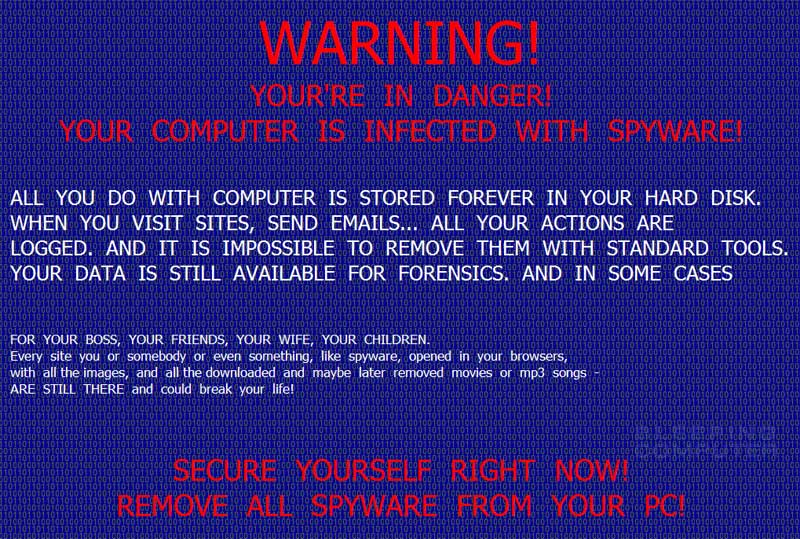
I’m trying to recover my laptop drive from a ridiculous malware infection. It’s something called “System Tools” and it does everything. Browser hijack, disallows Ctrl-Alt-Del, disallows access to most system functions, disallows Task Manager, disallows the running of anything that even looks like it could be helpful in removing it. It shows the most insanely over the top message about your system being infected:
System Tools screenshot courtesy of BleepingComputer.com
I’m scanning through that drive using Malwarebytes’ Anti-Malware tool.1 Oh, and the program was kind enough to completely corrupt the NTLDR on the root of the drive ultimately making it unbootable. Since the file was corrupted, I couldn’t install a new file over it. I ended up doing a disk scan of that laptop’s drive, fixing those errors, copying a fresh version of the NTLDR file over to that drive where the corrupted one was, and hours later I’m still scanning through that drive using Malwarebytes’ software.
It’s 2AM my time and there’s no real end to the scan in sight. Even after I’m done scanning and fixing and deleting those files, I’ll need to reinstall that drive into my laptop and see if it will boot. If not, I’ll need to copy out all of my e-mail files from Thunderbird for use on another computer. It’s not ideal by any means, but at least I’ll be (eventually) able to access my e-mails.
MWB has located 11 infected files so far. I’m thinking it’s nearing the end of its scan because it’s now on the Windows directory and it was appearing to work in alphabetical order. 2 Still, the Windows directory is enormous.
So… while I’m waiting for it to finish… There’s really only so much you can do to prevent something like this. Obviously, patching and updating your operating system, browsers, and security software is a must. As Cyrozap suggests, frequent backups are critical. 3 You could switch to a Mac or Linux/Ubuntu/Debian.
I’d consider switching OS’s, but networking with the PC’s in my home as well as using my network printer seems like they’re right at the top. Most of what I do these days is (a) e-mail via Thunderbird (b) web surfing and blogging via Firefox (c) word processing and spreadsheets via OpenOffice and (d) printing via ReplicatorG.
Okay. Malwarebytes says it’s removed 11 threats. What a rogue’s gallery. Blech. Time to disconnect the drive, pop it back into the laptop and see if I can boot it up. For the sake of you, dear reader, consider this the bit on a cooking show where something that takes me time to prepare is instantaneous for your viewing pleasure.
…
Okay, Windows says the file “hal.dll” is missing or corrupted. I’ll copy it over from this computer.
Dang. I did that. I’m getting a repeating pattern of boot, windows start options (safe mode, etc), windows loading, BSOD (blue screen of death) flash, and back to boot…
Dang. I can’t break this cycle and the BSODE flashes way too quickly for me to tell what file it might be causing the problem.
Hoo boy. This isn’t going to be fun.
It’s an anti-malware tool by Malwarebytes for removing malware using anti-malware techniques to for malware byte removal. [↩]
I would have started in reverse chron, but whatever. I’m not a malware expert. I just play one on this blog. [↩]