
There’s a new poll to the right. Basically, “Should Makerbot hire MakerBlock to blog for them?” So, take 5 seconds and cast your vote. Then, on to pictures of dinosaurs with lasers!!!
All things MakerBlock: RepRap, MakerBot, Cupcake CNC, open source, and plastic building toys!
There’s a new poll to the right. Basically, “Should Makerbot hire MakerBlock to blog for them?” So, take 5 seconds and cast your vote. Then, on to pictures of dinosaurs with lasers!!!
The guys at MakerBot just posted a job opening for a MakerBot blogger. As if their list of qualifications wasn’t daunting enough, the tweet that follows… Well, I’ll just let it speak for itself.
MakerBot Blogger Wanted: http://bit.ly/dur4vK (also: dinosaurs with lasers wanted)
You want a robot obsessed dinosaur with lasers? 1 What kind of a job posting is that?
Dear lovely wife,
I never meant for this to happen. It just sort of happened. It all started so innocently – reading about the RepRap project, going to the MakerFaire, buying a MakerBot, starting this blog, extra plastic here and there… and then MakerBot advertised for a blogger.
Tell the kids I love them, don’t forget to feed the dog, and there’s a post-it on the dresser for my boss.1
If you need to reach me, I’ll be camped out 87 3rd Ave, Brooklyn, NY 11217 until they let me in and hire me.
Love,
MakerBlock
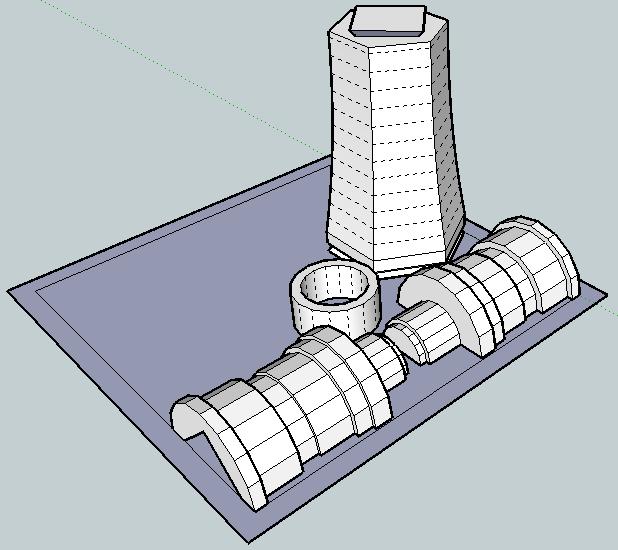
I just redesigned the printable screwdriver in order to make the parts fit together better and be more printable.
It should be easier to see how these parts go together.
Basically, you take the “mid-handle” at the far end of the build sheet, turn it upside right, clamp the two “lower handle” pieces on either side of it, and slide that bottom ring onto the lower handle.
I still need to redesign the upper handle, hollow out the mid-handle, and make sure there’s enough room inside for the GoodFET / electronic sonic screwdriver guts.
Now I’m wondering if it is also possible to make this a piece of MakerBot origami – and make it printable on one build sheet…
Origami is another of my hobbies and it is all about design constraints. 1 The rules are simple2 – one square sheet of paper only manipulated by folding. 3 Yet, within these rules it is theorized that a sufficiently skilled artisan can design and fold any arbitrary figure. I find folding origami to be at once cathartic and contemplative. 4
Pondering the design constraints within origami reminded me of one of my own recent designs – the 3x2x1 Rubik’s style puzzle cube. Quite apart from the medium or subject matter, I really liked the idea of a single print job resulting in parts that could be immediately hand-assembled without tools to form a useful object. Then I thought – if the design constraints are one of the things I like about this design, what else is possible within these same constraints?
Thus, I propose a new style of “MakerBot Origami”: One MakerBot print5 , multiple components6 , no tools or hardware7 .
What’s the coolest most awesome thing you can design within these constraints?
Update: Cyrozap – sory fore mispellnig yoru mane.
Thank you @tbuser for Tweeting this!
If I’m printing an object with a 0.5mm thickness, chances are the very first time there’s a slight overhang it will go pear shaped. When the walls are that thin, there’s almost nothing underneath even a very slight 20-30 degree overhang.
Duh.
Oh, my prior submission wasn’t good enough? COME ON! My lesson plan included a mineshaft AND a tiger shark! Here’s MakerBot’s description of a minimally detailed lesson plan:
Pssh. No problem. I can bang out a lesson plan that covers those points. How’s this:
If you use any of these lesson plans in your own classroom, please link to this blog post.
I’m going to warn you right now, this post has nothing to do with RepRap or MakerBot.
Three years ago I was unemployed with a big fat mortgage payment. The year that followed my newfound unemployment was a roller coaster. I took contract work for others, I had a few small clients of my own, taught myself how to program in PHP/MySQL, built my first website, tried to turn that website into a business, did some freelance programming, and generally did whatever I could do in order to make ends meet. It was an exciting and scary time. About a year after becoming unemployed I accepted an unsolicited job offer and have been there ever since.
I wish that I had read Tim Ferriss’ Four Hour Work Week and Guy Kawasaki’s Art of the Start back then.1 I just finished reading the FHWW for the first time and I’m glad I bought it. Like Reality Check and The Art of the Start before it, these are books I’m positive I will be using as reference manuals. It would have been sooo helpful to have Guy’s book around when I started my first website business. I needn’t have learn so many lessons the hard way.
The same goes for the FHWW. Tim’s book includes a lot of advice that would have been invaluable to me as an unemployed entrepreneur-by-circumstance2 . Basically, when I had a surplus of time and deficit of money. With a steady job I no longer have a deficit of money3 , but I do have a deficit of time. Some days I will daydream about what I could accomplish if only I had a little more time in the day. I won’t know until I try, but the Four Hour Work Week may just be my chance to find out.
Suffice it to say, I’ve read both books and will probably re-read both again soon. If you’re unemployed or want to start a business4 , you should definitely pick up both of these books.
Okay, back to your regularly scheduled nonsense. :)
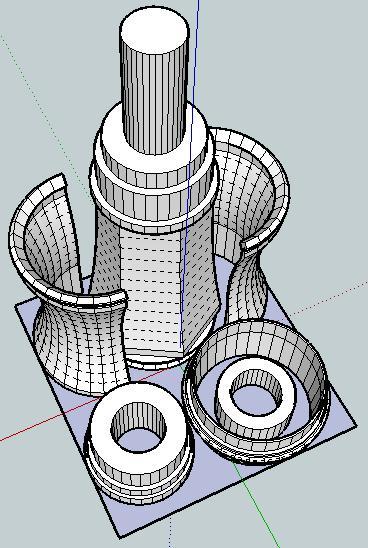
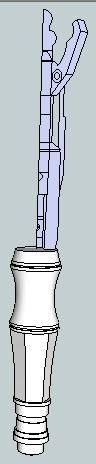
Off to the left is a picture of what the finished sonic screwdriver should look like. Here’s a picture of the parts I’ve designed so far. Assembled properly, these parts should be able to be assembled into the lower half of the sonic screwdriver.
I’ve arranged the parts so that they have a less than 60mm x 60mm footprint on the build platform. I would really like it if the final product could be printed all on one build plate and assembled without tools or additional non-printed pieces.
After my recent design-print fail, I’m going back to the drawing board (slightly)1 wiser. If nothing else, I like to think what I have so far is pretty neat. 2