DrawBot – Pen Selection, Part II

I believe my next challenge, aside from better DrawBot calibration, is to find a good pen and paper combination.

This afternoon after I got back from a meeting, but before I went back to the office, I stopped off at an office supply store.  The local craft/hobby store near work didn’t have any really big rolls of butcher/craft paper – which was very disappointing.  Luckily, the office supply store had a slightly larger roll of white paper. 1

I really went there to check out the pens.  And, there were a LOT of these pens.  An entire side of one large aisle was devoted to pens.  However, since this was an office supply store, you could only buy these pens in office supply quantities for office supply amounts.  I was not about to drop $20.00 for a five pack of multi-colored pens only to find out that that style of pen just doesn’t work in a near-horizontal drawing robot kung fu grip.  I even checked out the pen refills, which were more reasonable – but the selection wasn’t there.

One thing I did while I was there was write down the name of every brand name pen manufacturer I saw.  Here’s the list I came up with:

  • BIC
  • Cross
  • Montblanc
  • Paper Mate
  • Parker Quink
  • Penatia
  • Pentel
  • Pigma
  • Pilot
  • Sharpie
  • Uni ball
  • Waterman

While I understand Montblanc and Waterman pens to be on the expensive side, I would gladly pay for a pen that “just worked.”  I would point out that the Pigma was no where to be seen at the office supply store.  This is a really nice quality art pen and I’m actually surprised I didn’t see any of them when I was at the craft/hobby story yesterday.

One other side note… while at that craft/hobby store I noticed fountain pens.  I’ve never tried to write with one, but I did wonder how effective they would be in a nearly horizontal orientation.  It could result in some very cool drawing effects.

But, for now I think I’ll focus on robot calibration for the moment while I ponder this move.  In the meantime, if you’ve got a pen suggestion, please let me know!

Default Series Title
  1. For slightly cheaper than the craft store too! []

DrawBot – Drawing Success(ish)!!!

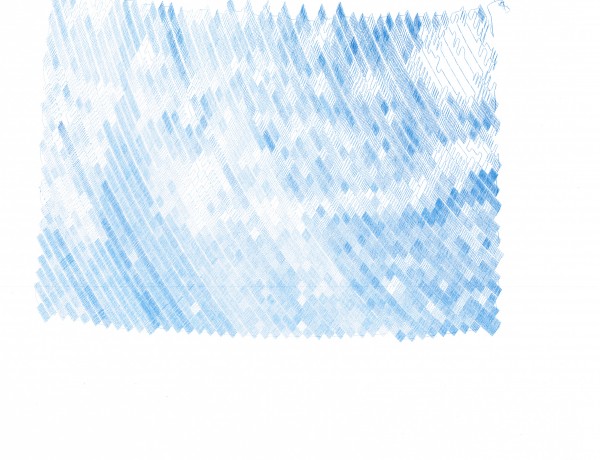
Starry Night by Van Gogh, drawn by a freakin’ narcoleptic robot

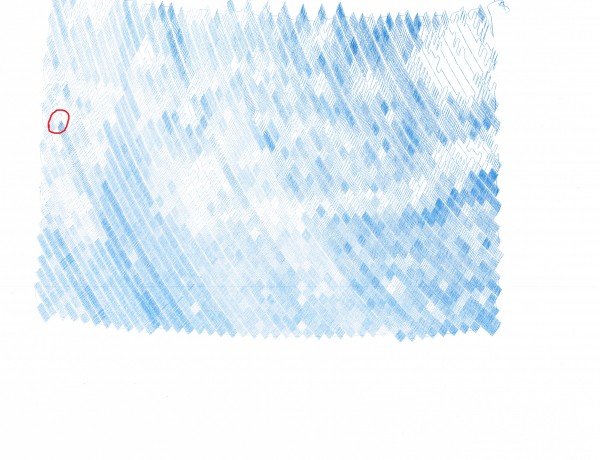
I think that turned out rather well!!!  If you look closely at the area circled in red in the next picture, you’ll see where there is a discontinuity in the line.  You may have to look at the large version to really see where this happens.

Starry Night by Van Gogh, drawn by a freakin’ narcoleptic robot, with the error circled

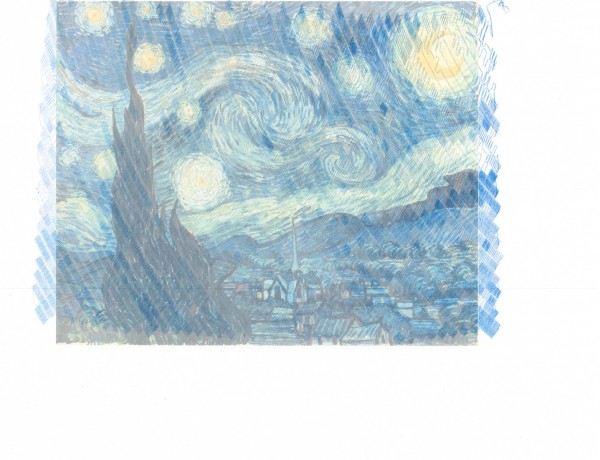
I suspect that my attempt to fix the stalled drawing probably did not have a role to play in the robot drawing off the top edge of the paper.  I think that is my fault for badly centering the paper on the robot.  Let’s see it again, without the red circle, with the original image overlaid.

Starry Night by Van Gogh, drawn by a freakin’ robot with narcolepsy, overlaid the subject image

There is clearly some calibration and whatnot to be done, but I’m still amazingly pleased with the results.  As much as I’ve blogged about drawing robots, the entire process from assembling parts ordered online to having a machine that actually draws stuff has been amazingly painless.  Based on the image above, it looks like I need to:

  • Adjust the aspect ratio, so that the image isn’t made too wide by the drawing process.  I suspect this has something to do with the “Setup->Machine Width” setting.  That was the setting that caused the drawing to be unnaturally narrow.
  • Adjust the amount of line that is unspooled in the center of the drawing.  I suspect this has something to do with the “Setup->MM per Rev” setting.  I have nothing upon which to base this suspicion except that my feeling is the robot is spooling out too little line.  I suspect that if I tell it that the spool is slightly smaller (closer to 47 than the 50 I’m using now) I would end up with a better result.
Default Series Title

DrawBot – How to Recover from a Stalled Print!

I should really have entitled this post “How to mostly recover from a stalled print.”  Several times now I’ve had a problem with the DrawBot stalling out and stopping a print.  When this has happened, hours can pass and the little ‘bot will do nothing at all.

Such as last night.  It was probably 80% done drawing Starry Night when it … just… stopped.

Here’s what I saw and here’s how I (mostly) fixed it:

  • The Symptoms
    • No DrawBot movement1
    • No scrolling of the command queue
    • The ‘bot status read “BUSY [insert normal seeming string command I didn’t write down]”2
    • The motors were quite warm
    • And the poor little Motor Shield was warm as well3
  • The Fix45
    •  I figured that, for whatever reason, the little ‘bot just seized up – but that perhaps if I could get it to respond to commands I might set it back on track.
    • The control software was responsive enough that I could “Queue->Export Queue“, which I did.
    • The problem with trying to reset the board or the control software and just feeding it the remaining part of the queue is that it wouldn’t remember where it was.  So, I figured if I could convince it that it was already where it was supposed to be, it might just continue on as if everything were okay.
    • I had seen from prior command queues that the code, “C09,NUMBER1,NUMBER2,END” appeared to be the way the machine would apply “Input->Set Pen Position.”
    • I then looked at the code that I had exported from the queue.  The first item was:
      • C05,3103,4350,29,133,END
    • So, I edited the text file so that it read as follows:
      • c09,3103,4350,END
      • C05,3103,4350,29,133,END
      • …the rest of the command queue
    • Which I believed essentially tell the ‘bot that it was where it was supposed to be and to continue on as if everything was normal.
    • I then disconnected the USB cable
    • Closed the control software
    • Restarted the control software
    • Reconnected the USB cable
    • Reestablished contact with the ‘bot, “Setup->Serial Port” and selected the port of choice for my laptop
    • Clicked the queue to start it up again…
    • It seems to have worked – but may possibly have shifted up one pixel.  This is why I say this was mostly a recovery.  I suspect that if I should have moved the pen down a little and see if I could get it to draw the next pixel in line.

I’ll scan and post this drawing as well and will point out the spot where I tried this little fix.

Default Series Title
  1. Doctor, she’s been acting listless… []
  2. … and unresponsive… []
  3. …and has a fever!  What should I do?! []
  4. VERY nearly almost called this the Cure and linked to a YouTube video.  It’s really just too damn early in the morning for me to write such a thing or you to read such a thing.  As much as I like the Cure, they’re not morning music, you know? []
  5. Like the Smiths []

DrawBot – Pen Selection

I just tried several pens.  Here’s what I’ve found:

  • “Fine point” Sharpie, black.  This is the kind you typically use.  It makes a huge, stinky, black line that leaks all over.  Not recommended.
  • “Ultra fine point” Sharpie, black.  This also leaked right through the paper, made a super thick line, and made such a mess I stopped the drawing.  Not recommended.
  • Pilot Precise Roling Ball V7, Fine, red.  I really like this style of pen for writing.  These gel pens feed ink easily, the ball point rarely gets messed up, and it’s just all-around easy to use.  Unfortunately, as you can see from some of the drawings, it didn’t like drawing at a nearly horizontal angle.  Even though I can see through the side that the pen has sufficient ink and that it is reaching the pen tip, it just wasn’t working very well.
  • Piolot G-2 10, black.  While excellent for writing, this pen was miserable for use in a DrawBot.
  • Uni-ball Deluxe Micro, blue.  So far, this pen is AWESOME.  It seems to write amazingly well on a nearly horizontal surface, no bleeding, and it draws a very fine line of blue.  I fully intend to buy several different colors of this pen.  I believe it comes in all kinds of colors – black, blue, green, and red.  If the drawing I’m having the robot work on now turns out, you’ll get to see just how awesome this pen really is.

As an FYI, Sandy recommends:

Very smooth paper (like Bristol board) with hard-tipped fineliner pens.  In the UK he uses ZIG Millennium pens.  He suggests that Pigma MICRON pens may be a good choice for those in the states.  I’ve used Pigma Micron pens for years and really like them for pen-and-ink drawing.  They’re great on regular photocopy paper as well as serious art paper.  I would have tried a Pigma pen, but I couldn’t find any around the house.  I know I’ve got a stack of them – I just can’t find ’em.  If and when I do, I’ll update this post.

Default Series Title
Test