
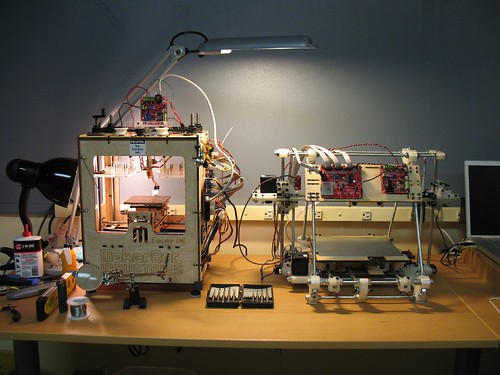
Okay, I’m liking the MakerBot and it’s RepRap child. But, check out that work area!
(I have the same 3-in-1 oil for my MakerBot. :) )
Okay, I’m liking the MakerBot and it’s RepRap child. But, check out that work area!
(I have the same 3-in-1 oil for my MakerBot. :) )
An actual honest-to-goodness Time And Relative Dimensions In Space machine? (Thx Tony!)
It just wasn’t the same without my old theme.
Of the several WordPress websites I have, this was the first one I moved to WordPress 3.0 when it came out. Unfortunately, 3.0 totally broke the hell out of my theme. I suspect it happened when the database was upgraded and it nuked the theme options. But, an upgrade to the theme1 and a little CSS spit and polish… and I’m back!
Edit: One unfortunate side effect of upgrading the theme was that it nuked my logo image. I found the original on Flickr, resized it, and dropped it back in. However, as you can tell from the nasty pixelation – I used “Paint” to resize. Blech. I’m going to have to redo that.

BotHacker recently documented his adventures in cooling fans and Skeinforge options – to amazing effect. 1 You should read the entire post, because there’s a lot of good info in there. However, to summarize:
BotHacker’s post is what Skeinforge documentation should look like.
Update: Per BotHacker’s comment below, “Skeinforge must be told to ‘Slow Down’ for this to work. The other option is ‘Orbit’, and may lead to poorer results.”
I just noticed that two parts I designed (an X-axis tensioner and Y-axis tensioner) are suggested prints on the MakerBot wiki. (Yes, I know it’s an open wiki – but I swear I didn’t add these things myself). It’s pretty cool that generations of MakerBots may be using upgrades I designed.
Internet fame and fortune are mine!
In terms of maintenance, there’s not much a MakerBot needs to stay happy:
What did I miss? How often do you do these things?
As I’ve mentioned before, I do all of my 3D modeling in Sketchup. It’s not open source, but it is free.1
Well, I’ve been monitoring the Capolight Electronics Blog lately – and it’s a good thing too. Besides having some seriously amazing information about the thermal properties of plastic, he’s just posted about some useful importing/exporting plugins for Sketchup. As easy as Sketchup is to use, it’s just not very good at exporting to STL. I haven’t tried these plugins out – but I’m hopeful they will do the job.
If you try them out, please let me know how it goes!